Data modeling with Cassandra
- by Eben Hewitt, Jeff Carpenter
- Publisher: O'Reilly Media, Inc.
- Release Date: December 2016
- ISBN: 9781491979716
Data Modelling
Conceptual Data Modeling
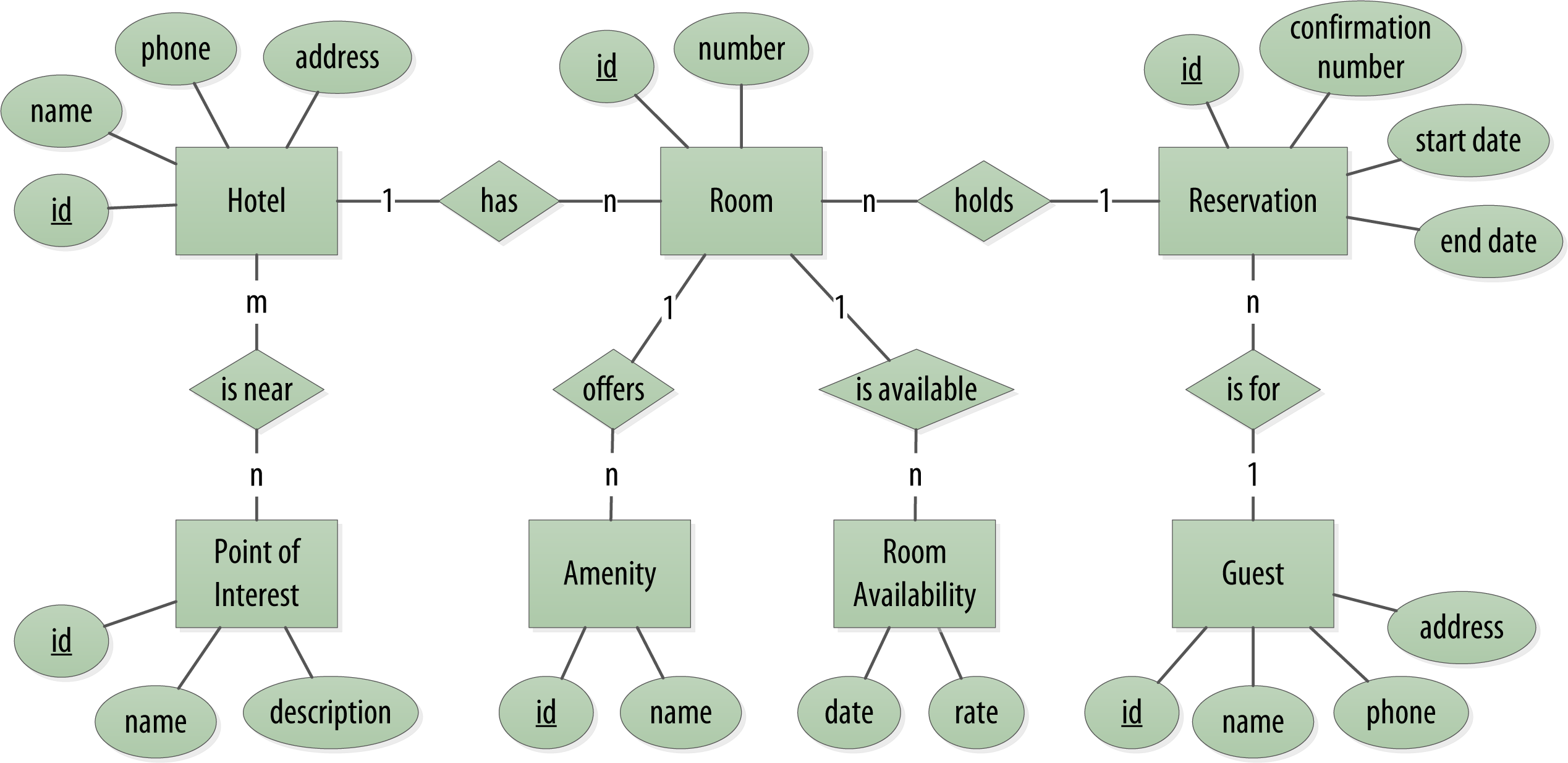
RDBMS Design
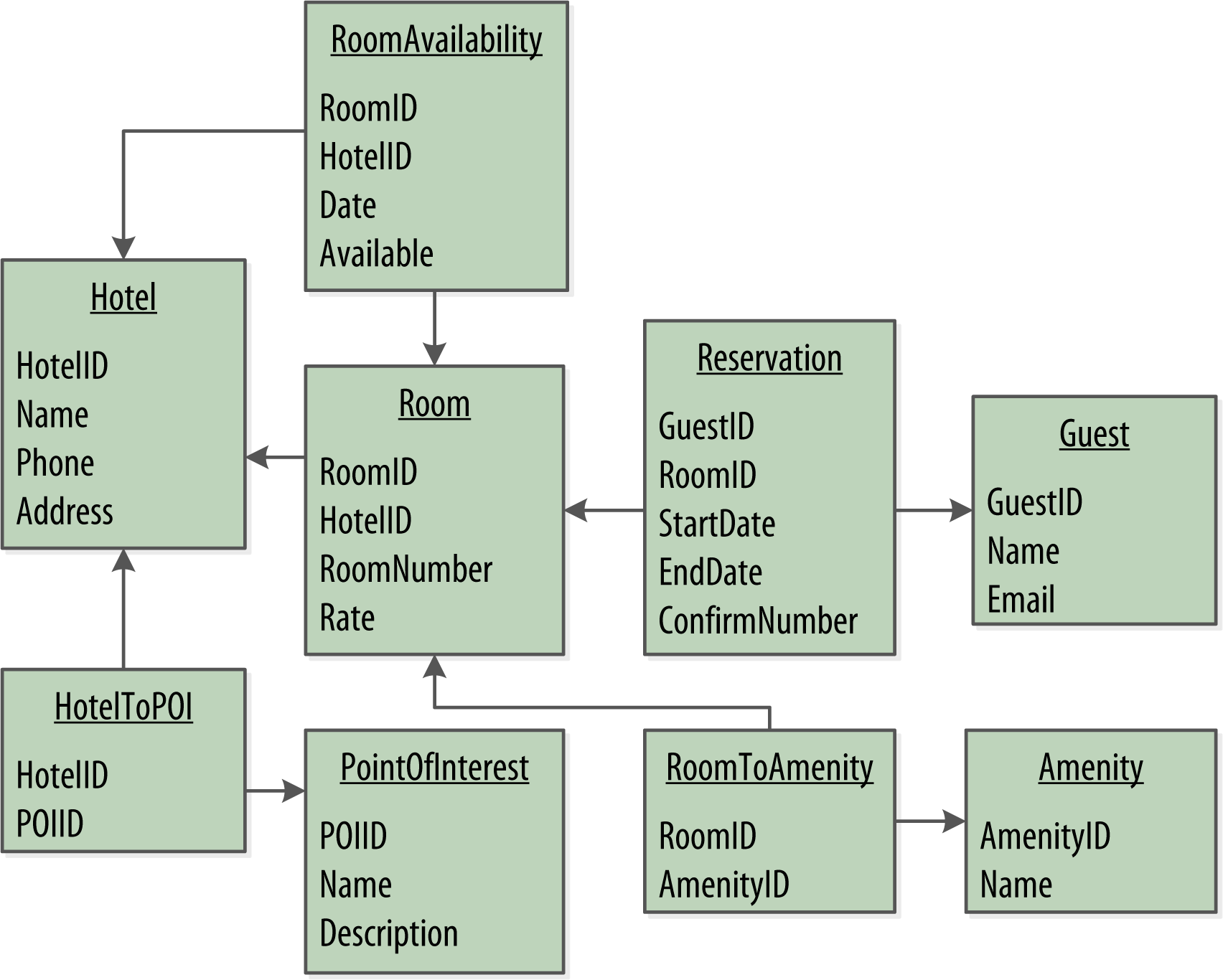
Design Differences Between RDBMS and Cassandra
No Joins
- Create a denormalized second table that represents the join results
No Referential Integrity
- store IDs related to other entities in your tables
- In a relational database, you could specify foreign keys. But Cassandra does not enforce this.
Denormalization
It is often the case that companies end up denormalizing data in relational databases as well. There are two common reasons for this.
Performance: Companies simply can’t get the performance they need when they have to do so many joins on years’ worth of data, so they denormalize along the lines of known queries.
Business document structure that requires retention: The common example here is with invoices
Query-First Design
Instead of modeling the data first and then writing queries, with Cassandra you model the queries and let the data be organized around them. Think of the most common query paths your application will use, and then create the tables that you need to support them.
Designing for Optimal Storage
- Create data models to minimize the number of partitions that must be searched in order to satisfy a given query
- Because the partition is a unit of storage that does not get divided across nodes, a query that searches a single partition will typically yield the best performance.
Sorting Is a Design Decision
- The sort order available on queries is fixed, and is determined entirely by the selection of clustering columns you supply in the CREATE TABLE command.
- The CQL SELECT statement does support ORDER BY semantics, but only in the order specified by the clustering columns.
Defining Application Queries
Number Your Queries
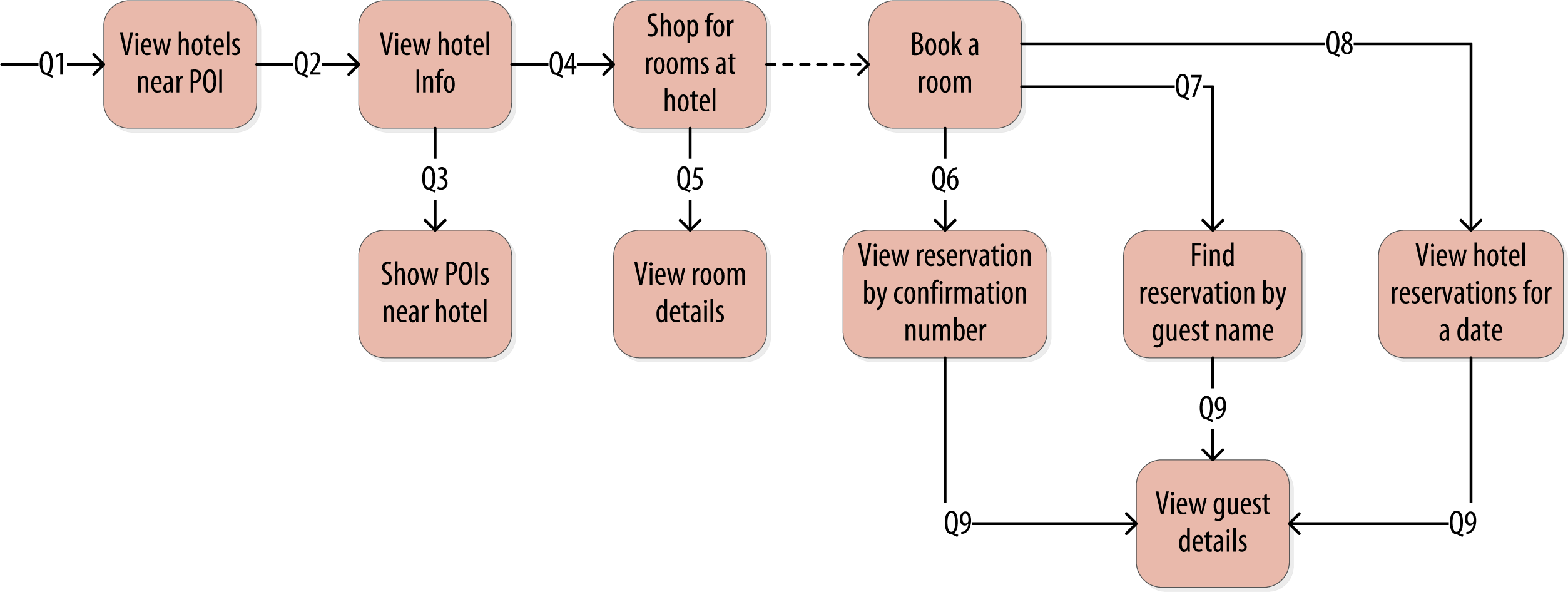
It is often helpful to be able to refer to queries by a shorthand number rather that explaining them in full. The queries listed here are numbered Q1, Q2, and so on, which is how we will reference them in diagrams as we move throughout our example.
Logical Data Modeling
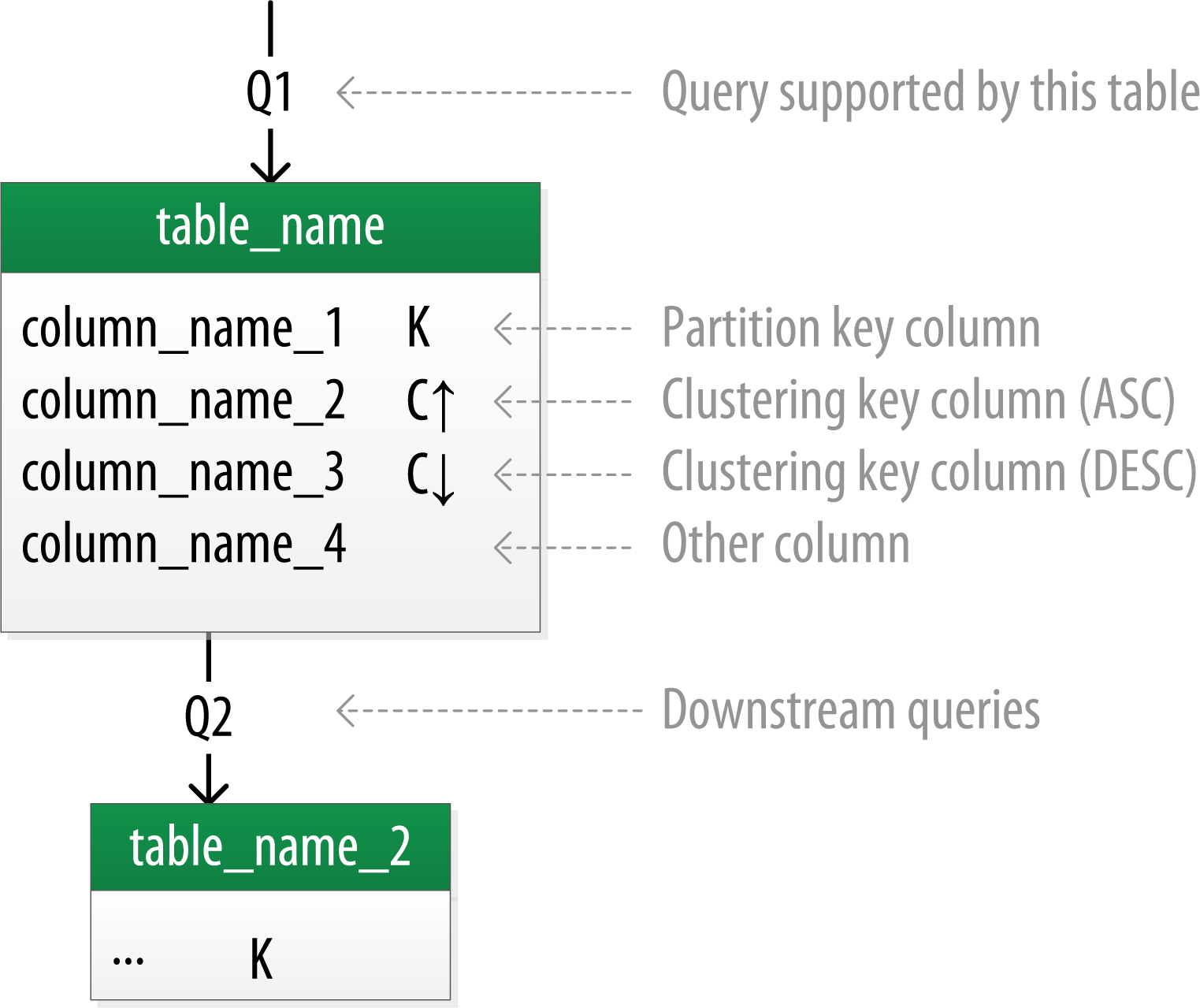
Introducing Chebotko Diagrams
Hotel Logical Data Model
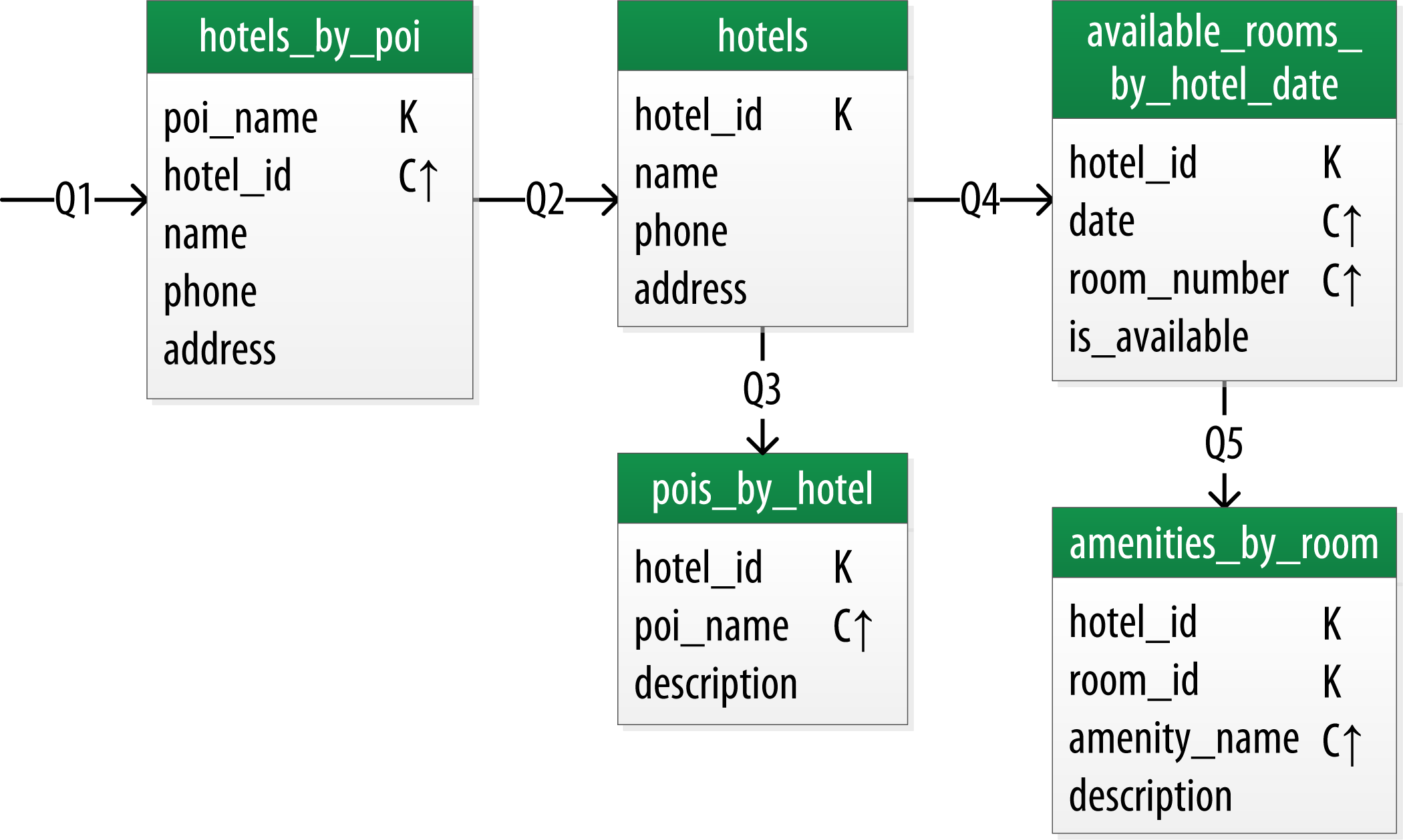
Make Your Primary Keys Unique
Otherwise you run the risk of accidentally overwriting data.
Using Unique Identifiers as References
It’s often helpful to use unique IDs to uniquely reference elements, and to use these uuids as references in tables representing other entities.
Searching Over a Range
Use clustering columns to store attributes that you need to access in a range query. Remember that the order of the clustering columns is important.
Reservation Logical Data Model
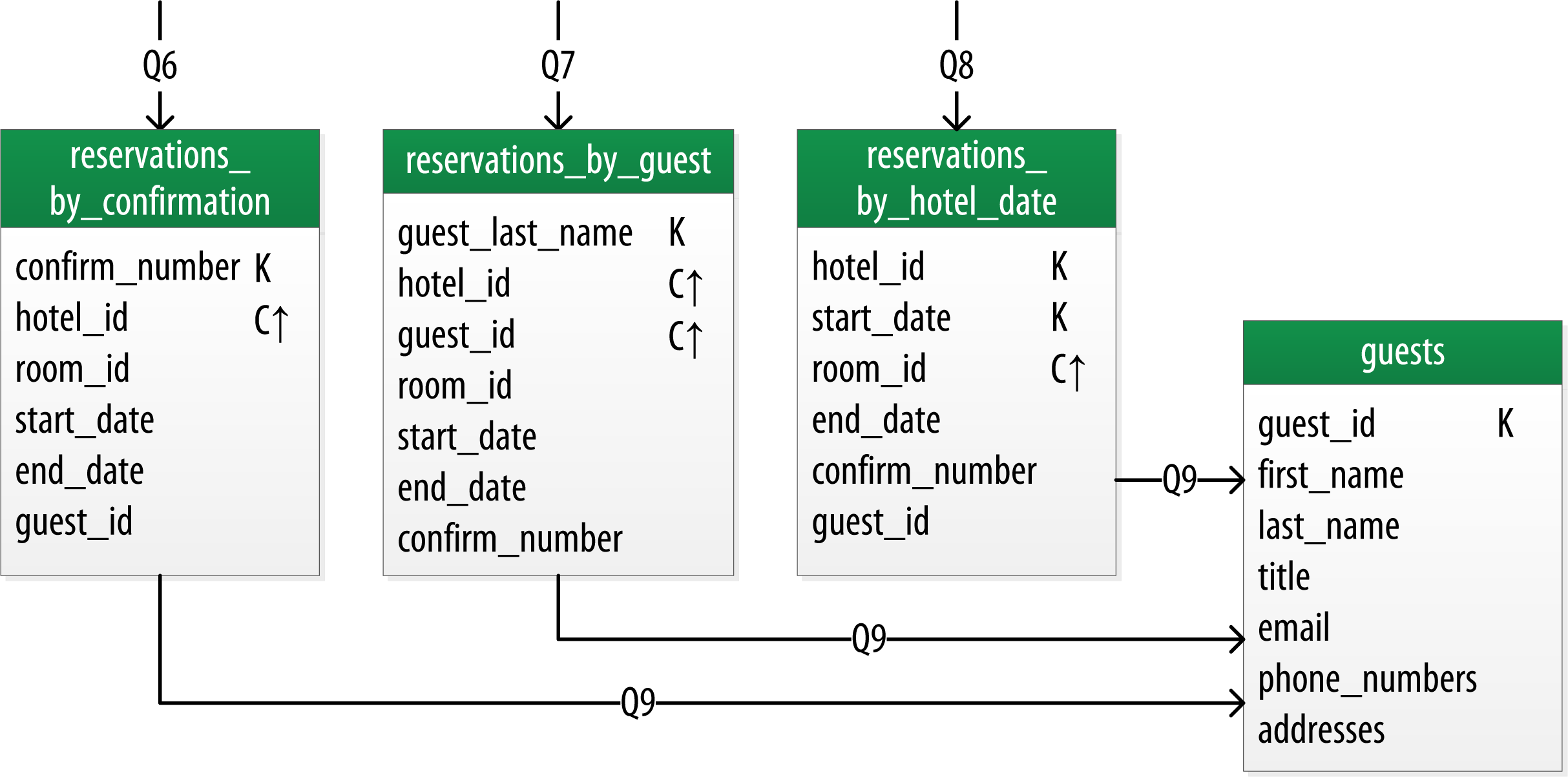
Design Queries for All Stakeholders
We need to create queries that support various stakeholders of our application, not just customers but staff as well, and perhaps even the analytics team, suppliers, and so on.
Patterns and Anti-Patterns
- The wide row pattern
- The time series pattern
- The queue anti-pattern
Physical Data Modeling
Chebotko Physical Diagrams
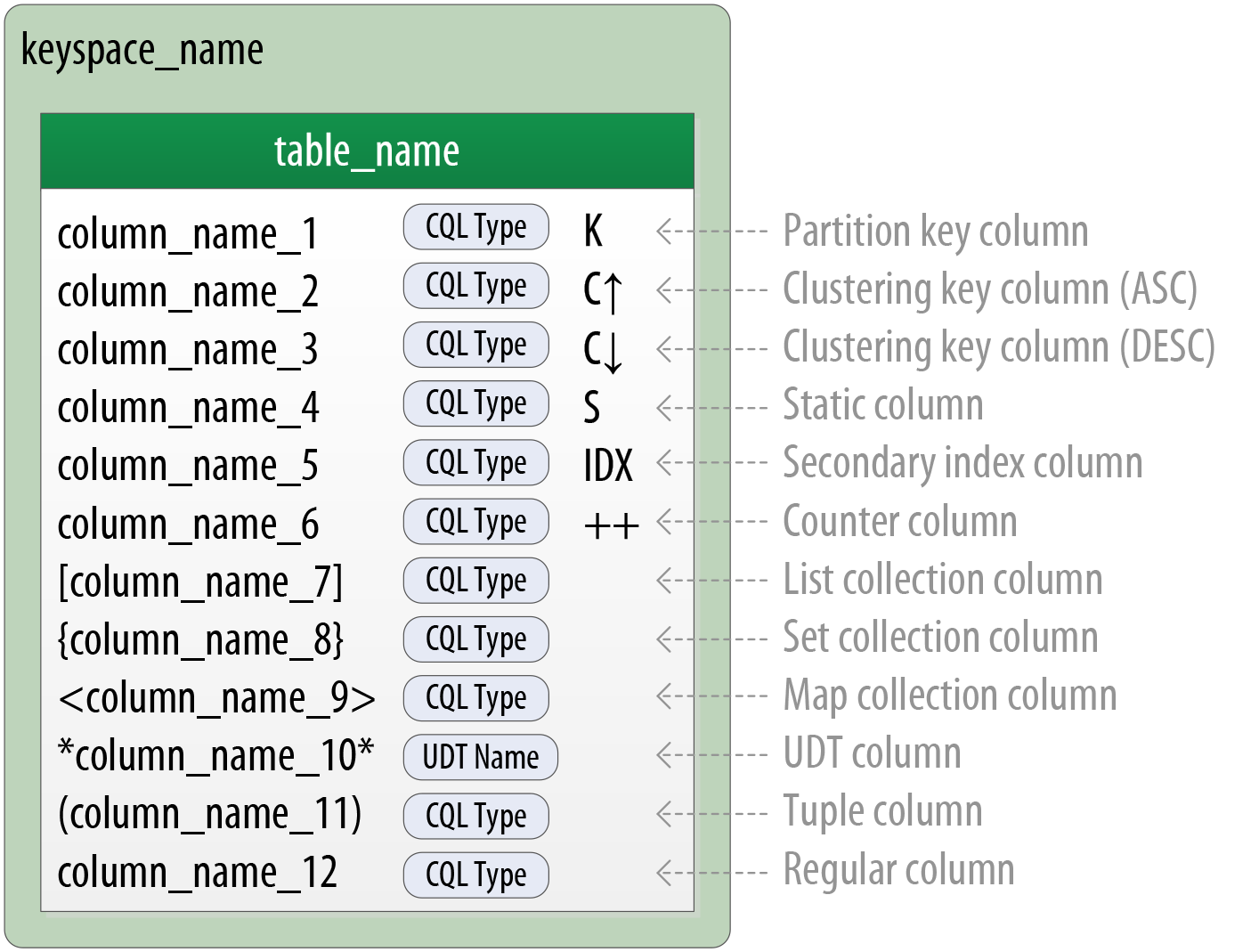
Hotel Physical Data Model
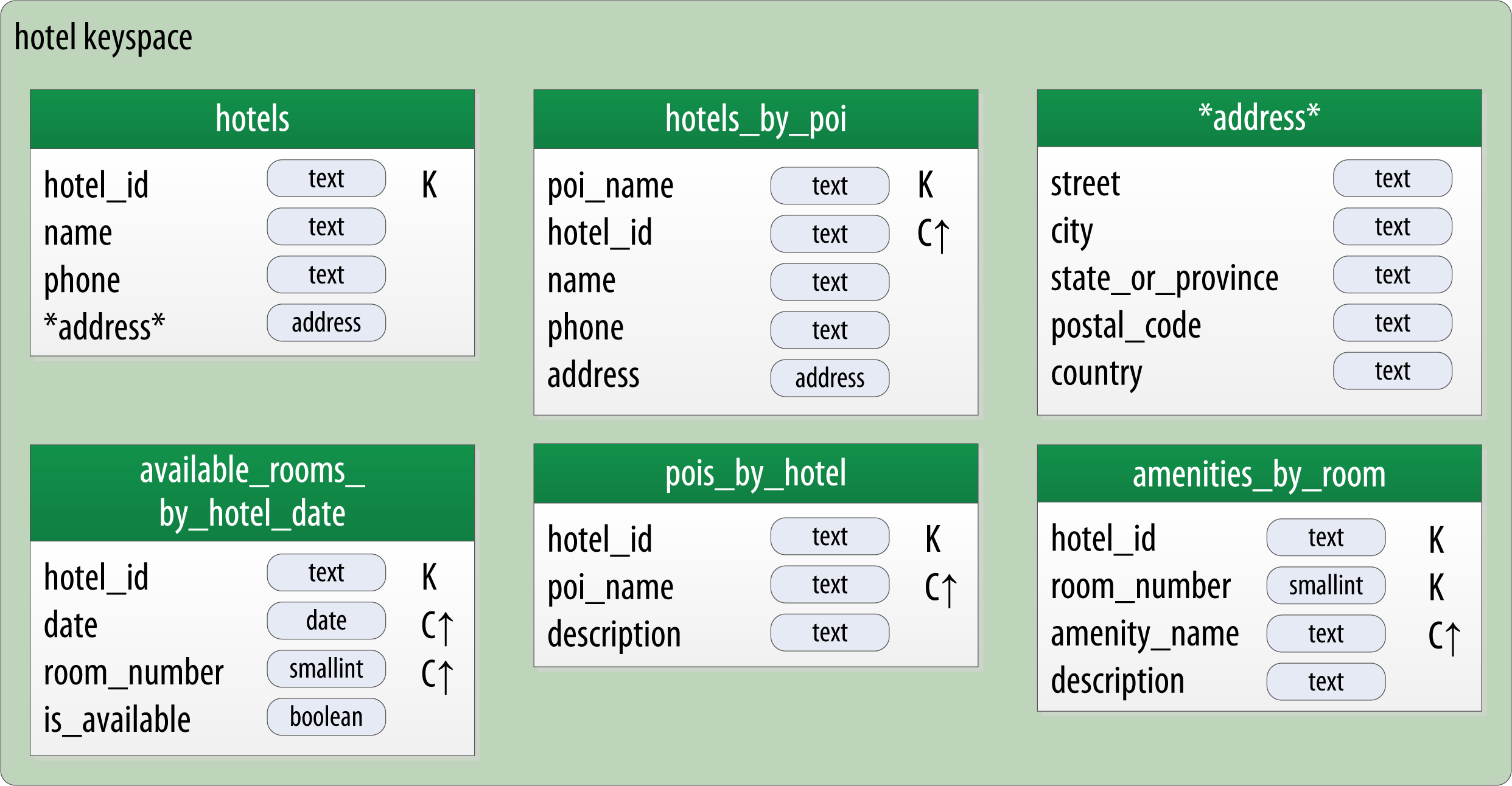
Taking Advantage of User-Defined Types
It is often helpful to make use of user-defined types to help reduce duplication of non-primary key columns, as we have done with the address user-defined type. This can reduce complexity in the design.
CREATE TYPE address (
... street text,
... city text,
... state text,
... zip_code int);
Remember that the scope of a UDT is the keyspace in which it is defined.
Reservation Physical Data Model
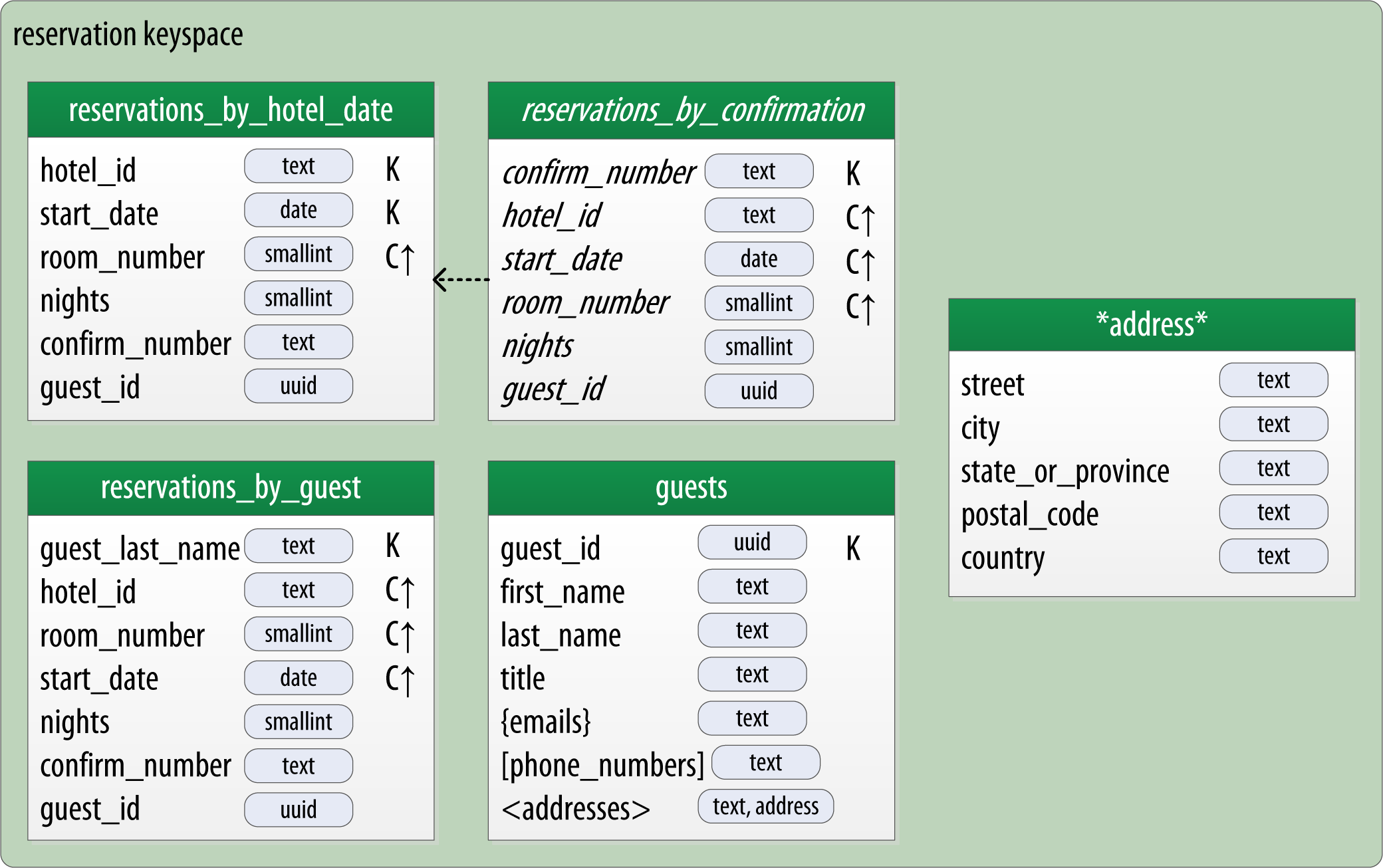
Materialized Views
- Creating indexes on columns with high cardinality tends to result in poor performance, because most or all of the nodes in the ring need are queried.
- Materialized views address this problem by storing preconfigured views that support queries on additional columns which are not part of the original clustering key.
CREATE MATERIALIZED VIEW reservation.reservations_by_confirmation
  AS SELECT *
  FROM reservation.reservations_by_hotel_date
  WHERE confirm_number IS NOT NULL and hotel_id IS NOT NULL and
    start_date IS NOT NULL and room_number IS NOT NULL
  PRIMARY KEY (confirm_number, hotel_id, start_date, room_number);
The
PRIMARY KEYclause identifies the primary key for the materialized view, which must include all of the columns in the primary key of the base table. This restriction keeps Cassandra from collapsing multiple rows in the base table into a single row in the materialized view, which would greatly increase the complexity of managing updates.The
WHEREclause provides support for filtering. Note that a filter must be specified for every primary key column of the materialized view, even if it is as simple as designating that the value IS NOT NULL.
Enhanced Materialized View Capabilities
The initial implementation of materialized views in the 3.0 release has some limitations on the selection of primary key columns and filters. There are several JIRA issues in progress to add capabilities.
Evaluating and Refining
Calculating Partition Size
In order to calculate the size of our partitions, we use the following formula:
Nv = Nr(Nc - Npk - Ns) + Ns
The number of values (or cells) in the partition (Nv) is equal to the number of static columns (Ns) plus the product of the number of rows (Nr) and the number of of values per row. The number of values per row is defined as the number of columns (Nc) minus the number of primary key columns (Npk) and static columns (Ns).
Estimate for the Worst Case
Consider calculating the worst case as well, as these sorts of predictions have a way of coming true in successful systems.
Calculating Size on Disk
We use the following formula to determine the size St of a table:

- ck refers to partition key columns, cs to static columns, cr to regular columns, and cc to clustering columns.
- the number of rows Nr and number of values Nv from our previous calculations.
- The sizeOf() function refers to the size in bytes of the CQL data type of each referenced column.
Breaking Up Large Partitions
- add an additional column to the partition key
- introduce an additional column to the table to act as a sharding key, but this requires additional application logic
Defining Database Schema
CREATE KEYSPACE hotel
    WITH replication = {'class': 'SimpleStrategy', 'replication_factor' : 3};

CREATE TYPE hotel.address (
    street text,
    city text,
    state_or_province text,
    postal_code text,
    country text
);

CREATE TABLE hotel.hotels_by_poi (
    poi_name text,
    hotel_id text,
    name text,
    phone text,
    address frozen<address>,
    PRIMARY KEY ((poi_name), hotel_id)
) WITH comment = 'Q1. Find hotels near given poi'
AND CLUSTERING ORDER BY (hotel_id ASC) ;

CREATE TABLE hotel.hotels (
    id text PRIMARY KEY,
    name text,
    phone text,
    address frozen<address>,
    pois set<text>
) WITH comment = 'Q2. Find information about a hotel';

CREATE TABLE hotel.pois_by_hotel (
    poi_name text,
    hotel_id text,
    description text,
    PRIMARY KEY ((hotel_id), poi_name)
) WITH comment = 'Q3. Find pois near a hotel';

CREATE TABLE hotel.available_rooms_by_hotel_date (
    hotel_id text,
    date date,
    room_number smallint,
    is_available boolean,
    PRIMARY KEY ((hotel_id), date, room_number)
) WITH comment = 'Q4. Find available rooms by hotel / date';

CREATE TABLE hotel.amenities_by_room (
    hotel_id text,
    room_number smallint,
    amenity_name text,
    description text,
    PRIMARY KEY ((hotel_id, room_number), amenity_name)
) WITH comment = 'Q5. Find amenities for a room';
Identify Partition Keys Explicitly
We chose to represent our tables by surrounding the elements of our partition key with parentheses, even though the partition key consists of the single column poi_name. This is a best practice that makes our selection of partition key more explicit to others reading our CQL.
CREATE KEYSPACE reservation
    WITH replication = {'class': 'SimpleStrategy', 'replication_factor' : 3};

CREATE TYPE reservation.address (
    street text,
    city text,
    state_or_province text,
    postal_code text,
    country text
);

CREATE TABLE reservation.reservations_by_hotel_date (
    hotel_id text,
    start_date date,
    end_date date,
    room_number smallint,
    confirm_number text,
    guest_id uuid,
    PRIMARY KEY ((hotel_id, start_date), room_number)
) WITH comment = 'Q7. Find reservations by hotel and date';

CREATE MATERIALIZED VIEW reservation.reservations_by_confirmation AS
    SELECT * FROM reservation.reservations_by_hotel_date
    WHERE confirm_number IS NOT NULL and hotel_id IS NOT NULL and
        start_date IS NOT NULL and room_number IS NOT NULL
    PRIMARY KEY (confirm_number, hotel_id, start_date, room_number);

CREATE TABLE reservation.reservations_by_guest (
    guest_last_name text,
    hotel_id text,
    start_date date,
    end_date date,
    room_number smallint,
    confirm_number text,
    guest_id uuid,
    PRIMARY KEY ((guest_last_name), hotel_id)
) WITH comment = 'Q8. Find reservations by guest name';

CREATE TABLE reservation.guests (
    guest_id uuid PRIMARY KEY,
    first_name text,
    last_name text,
    title text,
    emails set<text>,
    phone_numbers list<text>,
    addresses map<text, frozen<address>>,
    confirm_number text
) WITH comment = 'Q9. Find guest by ID';
DataStax DevCenter
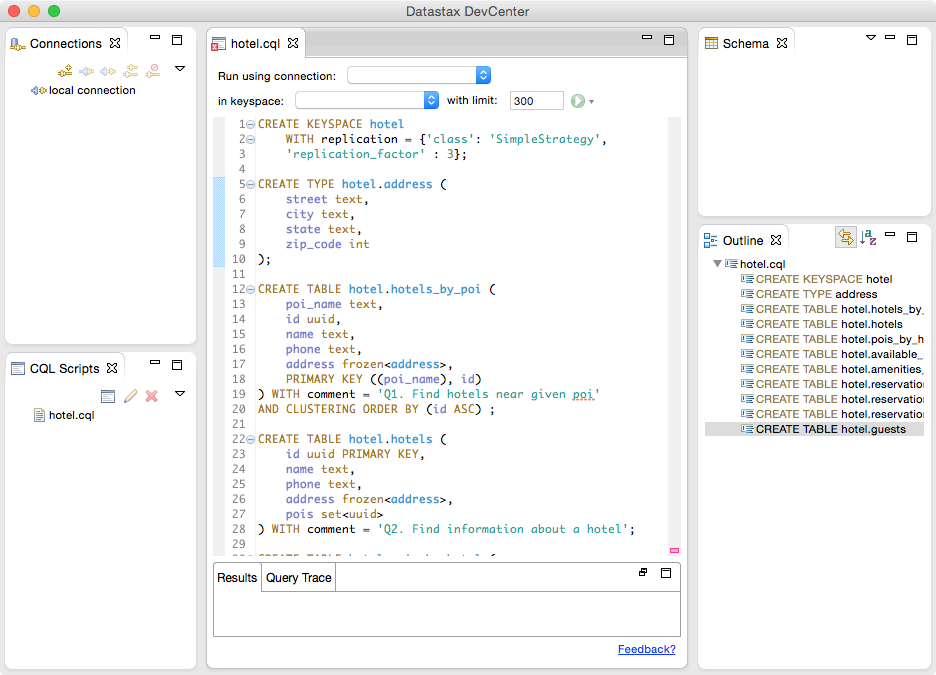
The middle pane shows the currently selected CQL file, featuring syntax highlighting for CQL commands, CQL types, and name literals. DevCenter provides command completion as you type out CQL commands and interprets the commands you type, highlighting any errors you make. The tool provides panes for managing multiple CQL scripts and connections to multiple clusters. The connections are used to run CQL commands against live clusters and view the results.
Summary
In this chapter, we saw how to create a complete, working Cassandra data model and compared it with an equivalent relational model. We represented our data model in both logical and physical forms and learned a new tool for realizing our data models in CQL.